See Which Bytes Changed Between Two Files

TL;DR: Hex Compare is a free online tool that shows the byte-level differences between any two files — hex and ASCII side by side, insertions kept aligned, a change list to step through — right in your browser, no signup, nothing uploaded or transferred.For firmware, exports, save files — anywhere “binary files differ” isn't an answer.

Start Comparing Files…
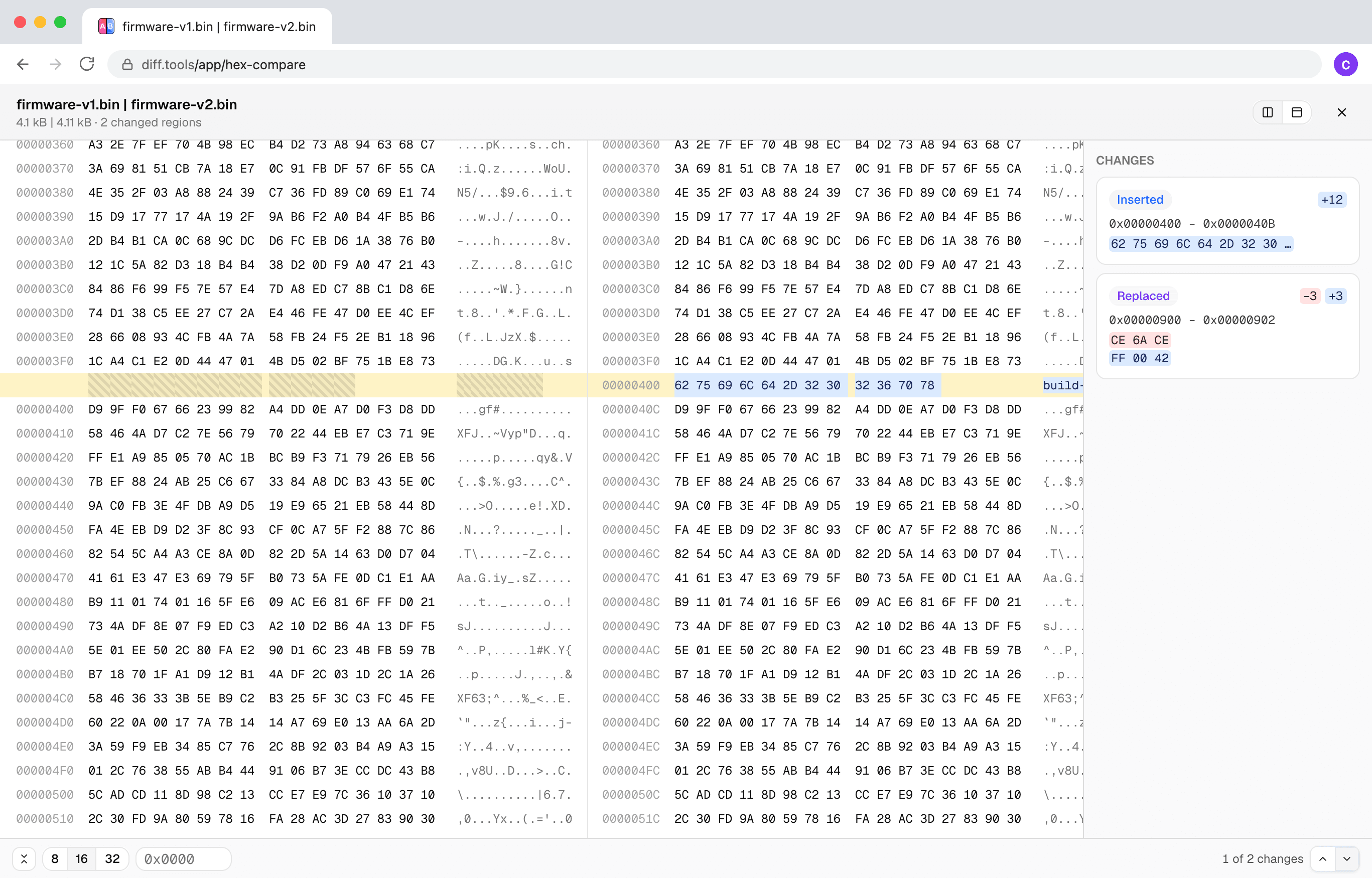
Screenshot of Hex Compare
Christopher Atlan

開発者: Christopher Atlan(Leitmotif GmbH)。 2020年からファイル比較ツールを、18年以上ソフトウェアを作り続けています。 diff.toolsの考え方はひとつ。フォーマットごとに特化したツールがあり、その結果を次のツールへ渡せます。

A quick tour

  1. An insert is an insert

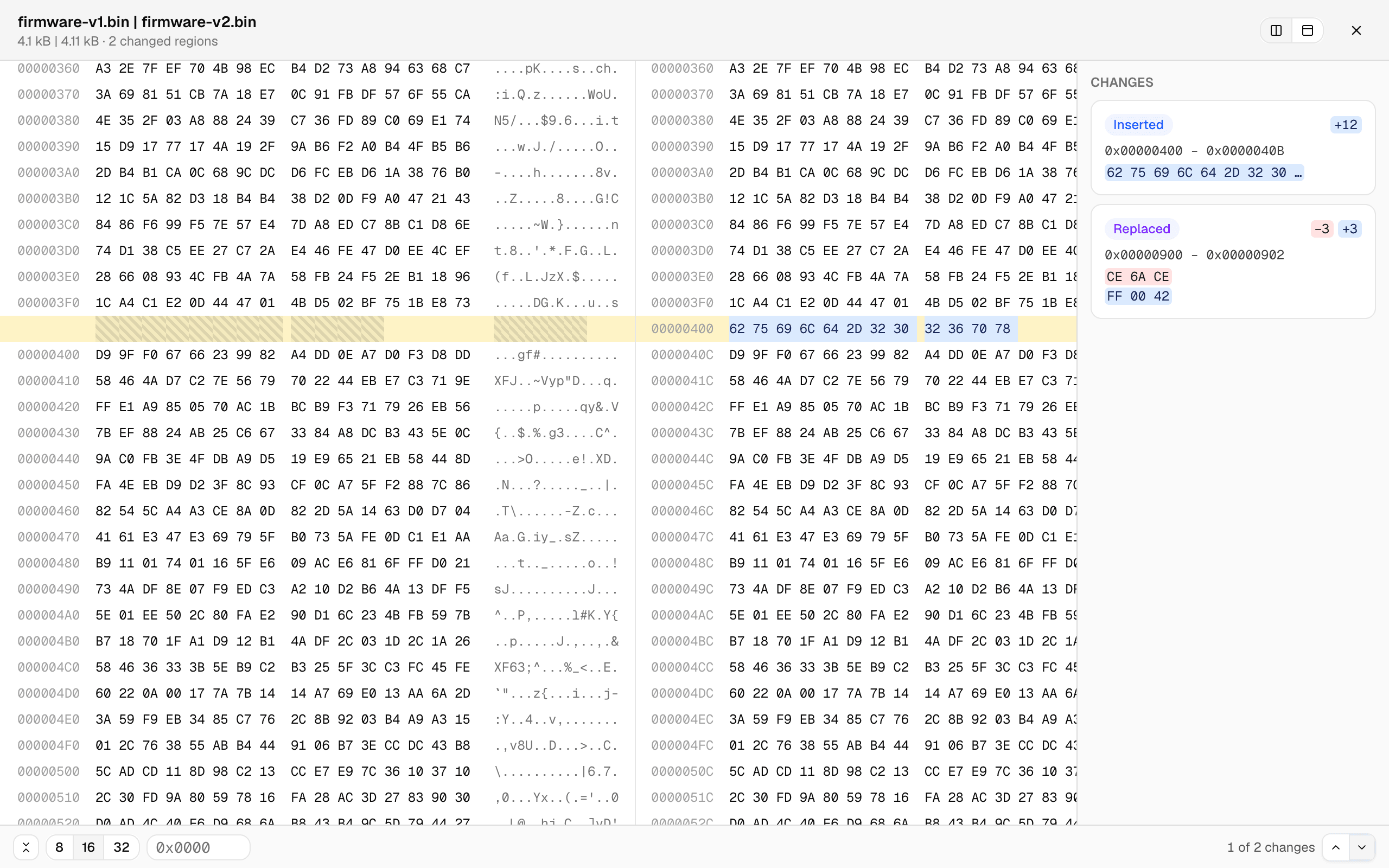
    Most byte-by-byte tools fall apart the moment a file grows by a few bytes: everything after the insertion “differs.” Here the files are aligned by content — below, 12 inserted bytes show as one small insert, the offsets diverge, and every row after still lines up.

    Two binary files side by side in hex: a 12-byte insertion highlighted at offset 0x400 with the gap hatched on the left file, rows aligned before and after
  2. A change list, not a scavenger hunt

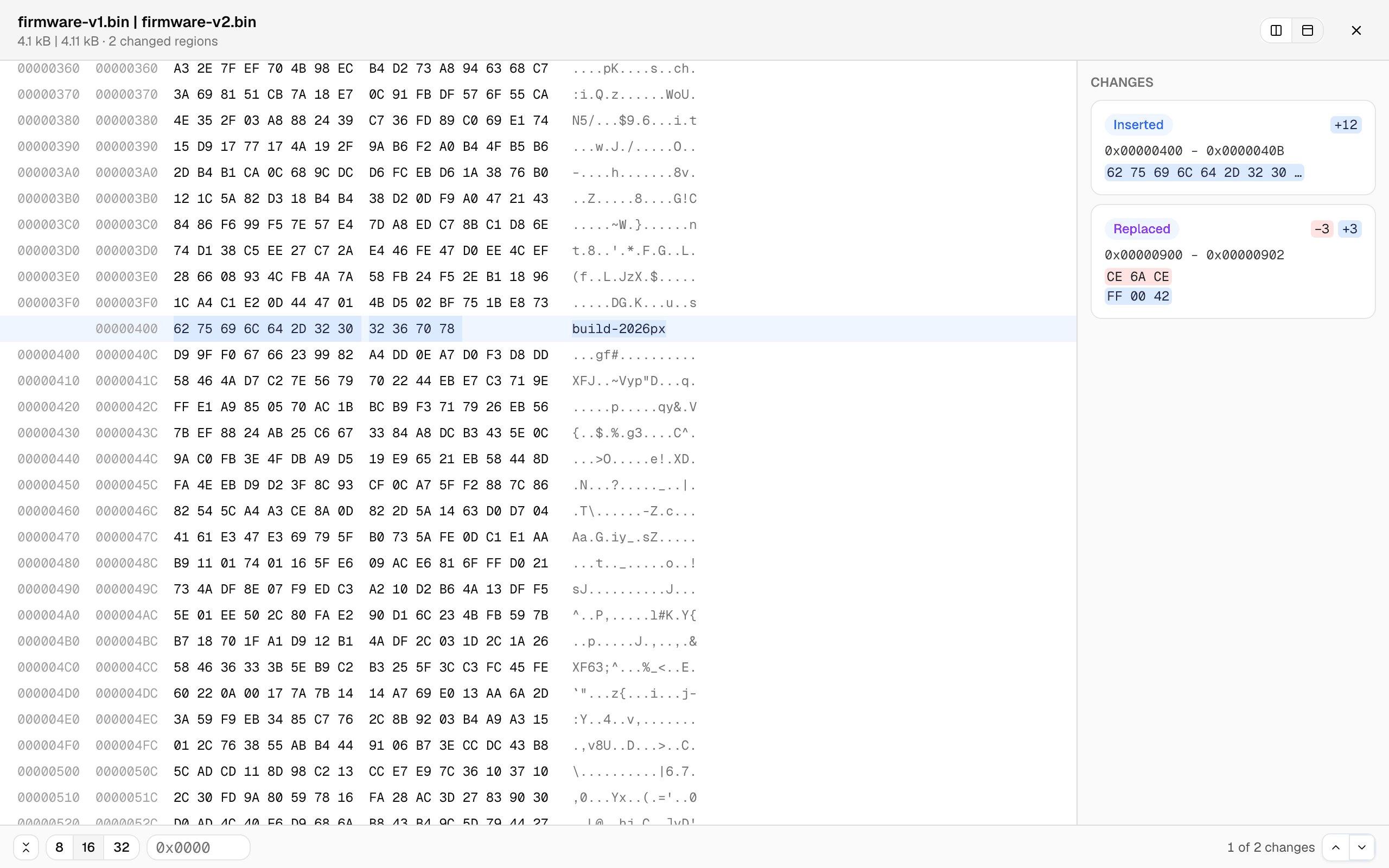
    Every changed region is a card — offset range, the bytes before and after — and clicking one jumps straight there. Or type an offset. The unified view shows both files' offsets in one aligned grid, and the row width switches between 8, 16, and 32 bytes.

    The unified byte view: dual offset columns, the inserted bytes reading 'build-2026px' in the ASCII column, and change cards listing the insert and the replaced bytes
  3. Big files stay smooth

    The comparison runs in a background worker with live progress, and only the rows on screen are rendered — so multi-megabyte files scroll like small ones. Files that turn out to be completely unrelated degrade gracefully to a coarse alignment with an honest badge instead of a hung tab.

How to compare two binary files?

  1. Open the free hex comparison tool — it runs in any current browser, on your device, no signup.

  2. Click Choose File A and pick the first file, then Choose File B for the other one. Any file type works.

  3. Step through the change list, or jump straight to an offset. Side-by-side and unified views keep the byte rows aligned even across insertions.

Frequently asked questions

  1. Does it work with large files?

    Yes. The comparison runs in a background worker with live progress, and the byte grid only renders what’s on screen — multi-megabyte files stay smooth.

  2. Are my files uploaded?

    No. The comparison runs entirely in your browser; file contents never leave your device.

  3. Can it edit bytes?

    No — it’s a comparer, not a hex editor. It shows you what changed; it never touches your files.

  4. Which browsers are supported?

    Any current browser — Chrome, Edge, Firefox, and Safari all work.

Requirements

Any current browser.

プライバシーとデータ処理

プライバシーとセキュリティは、期待するだけのものではありません。要求すべきものです。最新のブラウザにより、すべてをお使いのデバイス上で直接処理できます。つまり、ファイルをアップロード、転送、共有することは一切ありません。

お客様のファイルは完全にプライベートに保たれます。すべての比較はブラウザ内でローカルに行われます。お客様のデータは常にお客様のものです。

LeitmotifChristopher Atlan
+2

このツールを作っているチーム

私たちはLeitmotif、アルプス地方(オーストリアのケルンテン州とドイツのバイエルン州)の小さな会社です。ファイル比較は私たちの本業です。Mac用diffアプリのKaleidoscopeを開発しており、diff.toolsはその経験をブラウザに持ち込んだものです。

プロフェッショナル向けのツールは、見た目が美しく、使っていて楽しく、そして仕事をやり遂げるのに必要な力をすべて備えているべきだと考えています。そして、私たちはあなたのファイルを尊重しているからこそ、決してアップロードしません。ここにあるすべては、あなたのマシン上で動きます。

Feedback

We're constantly improving our free online hex comparison to make it faster and more accurate. Share your feedback and help us understand what kind of files you compare.

このページを共有

FacebookLinkedInRedditLINETelegramWhatsApp